

How to Attach a Dynamic Web Template (.dwt) to a Web Page
You can attach the Special Collections dynamic web template to any other Special Collections web page to achieve a consistent look and feel for the website.
- Open a new or existing web page in Microsoft Frontpage.
- Click on Format > Dynamic Web Template > Attach Dynamic Web Template.
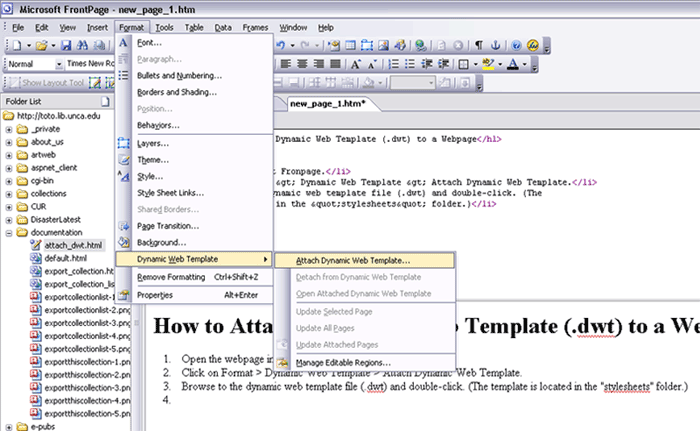
- Browse to the dynamic web template file ("main.dwt") in the "stylesheets" folder under toto.lib.unca.edu. Double-click the "main.dwt" file.
-
If attaching a dynamic web template to an existing web page, you must map the
existing web page's content to the template. Highlight the line in the box as
shown below. This tells Frontpage to place the "Body" of the existing web page
into the "content" area of the template. Click OK.
