

Entering Series and Subseries
In many collections, items are grouped into series. A series is a group of items that has a similar format or information content. For example, the items of a manuscript collection might be divided into three series: Financial Records, Correspondence, and Committee Meeting Minutes. In some large and complex collections, series might be further subdivided into subseries. For example, the Financial Records series might be divided into distinct subseries for each decade. Not all collections include series or subseries.
- Collections with no series or subseries
- Collections with series but no subseries
- Collections with series and subseries
Collections with no series or subseries
The Collections form of the database includes an area for recording series and subseries.

-
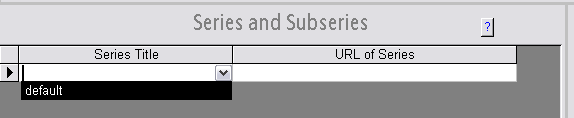
If the collection includes no series or subseries, indicate this by choosing "default" as name of the series and subseries. Click on the drop-down arrow in the "Series Title" column and choose "default".
-
If you intend to list the collection's items on a separate web page instead of recording item-level information in the database, use the "URL of Series" column to indicate the URL of the web page where the items are listed. A link pointing to the web page will be created on the XML finding aid. If you do not intend to list the collection's items on a separate web page, leave the column blank.

-
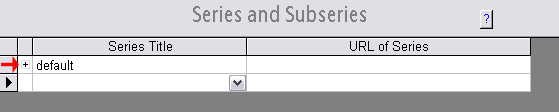
After you enter data in the first row of the series list, a new empty row will appear beneath it. If you click in the empty row, a plus sign (+) will appear beside the series you just entered. Click the plus sign (+) to display the subseries fields for that series.
-
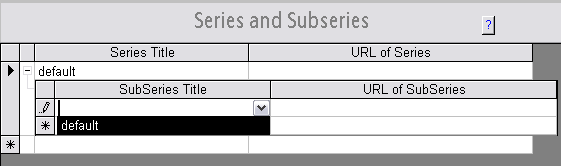
Click on the drop-down arrow in the "Subseries Title" column and choose "default". Do not enter a value in the "URL of SubSeries" column.
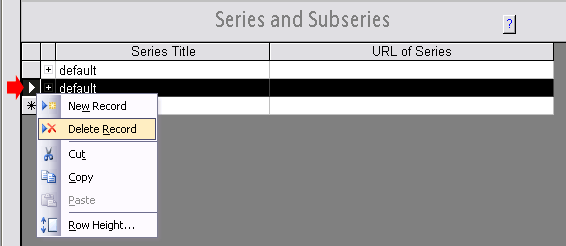
- IMPORTANT: If you need to delete a series or subseries, click in the box
to the left of the row to highlight the entire row, then press the delete
key or right-click and choose "Delete Record". Simply erasing the text will
not fully delete the record. Note also that when you delete a series or
subseries, any items you have already entered on the Items form under that
series or subseries will also be deleted.
top
Collections with series but no subseries
- The Collections form of the database includes an area for
recording series and subseries.
- If the collection includes series but no subseries, list the names of
the series, one per row, in the "Series Title" column.
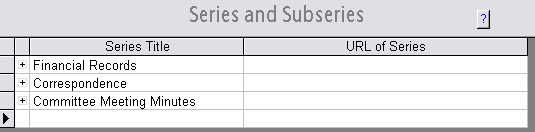
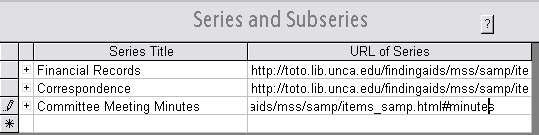
- If you intend to list the collection's items on a separate web page
instead of recording item-level information in the database, use the "URL of
Series" column to indicate the URL of the web page where the items for that
series are listed. A link pointing to the web page will be created on the
XML finding aid. (If you intend to list the items for multiple series on a
single web page, you can use page anchors (bookmarks) to link directly to
the portion of the page where the items for a particular series are listed,
as shown below for "Committee Meeting Minutes".) If you do not intend to
list the collection's items on a separate web page, leave the "URL of
Series" column blank.
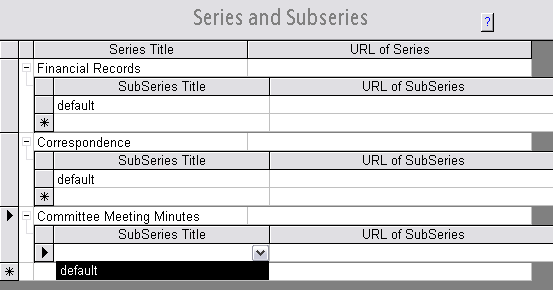
- Click on the plus sign (+) beside each series to display the subseries
fields.
For each series, click on the drop-down arrow in the "SubSeries Title"
column and choose
"default". Do not enter a value in the "URL of SubSeries"
column.
- IMPORTANT: If you need to delete a series or subseries, click in the box
to the left of the row to highlight the entire row, then press the delete
key or right-click and choose "Delete Record". Simply erasing the text will
not fully delete the record. Note also that when you delete a series or
subseries, any items you have already entered on the Items form under that
series or subseries will also be deleted.
top
Collections with series and subseries
- The Collections form of the database includes an area for
recording series and subseries.
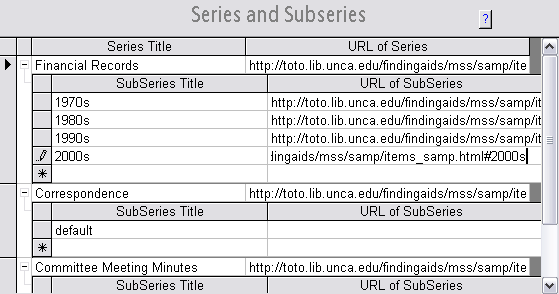
- If the collection includes series and subseries, list the names of the
series, one per row, in the "Series Title" column.
- If you intend to list the collection's items on a separate web page
instead of recording item-level information in the database, use the "URL of
Series" column to indicate the URL of the web page where the items for that
series are listed. A link pointing to the web page will be created on the
XML finding aid. (If you intend to list the items for multiple series on a
single web page, you can use page anchors (bookmarks) to link directly to
the portion of the page where the items for a particular series are listed,
as shown below for "Committee Meeting Minutes".) If you do not intend to
list the collection's items on a separate web page, leave the "URL of
Series" column blank.
- Click on the plus sign (+) beside each series to display the subseries
fields.
For each series, list the names of the subseries, one per row, in the "SubSeries
Title" column. If a particular series does not include any subseries, click
on the drop-down arrow in the "Subseries Title" column for that
series and choose "default".
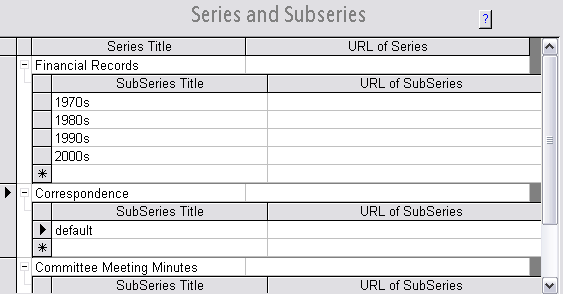
- If you intend to list the collection's items on a separate web page
instead of recording item-level information in the database, use the "URL of SubSeries"
column to indicate the
URL of the web page where the items for that subseries are listed. A link
pointing to the web page will be created on the XML finding aid. (If you
intend to list the items for multiple subseries on a single web page, you
can use page anchors (bookmarks) to link directly to the portion of the page
where the items for a particular series are listed, as shown below for the
"2000s" subseries.) If you do not intend to list the collection's items on a
separate web page (or you only wish to provide links to the series headings
but not
the subseries headings on the separate web page), leave the "URL of SubSeries"
column blank.
- IMPORTANT: If you need to delete a series or subseries, click in the box
to the left of the row to highlight the entire row, then press the delete
key or right-click and choose "Delete Record". Simply erasing the text will
not fully delete the record. Note also that when you delete a series or
subseries, any items you have already entered on the Items form under that
series or subseries will also be deleted.
top