

Entering Items in the
Items Form
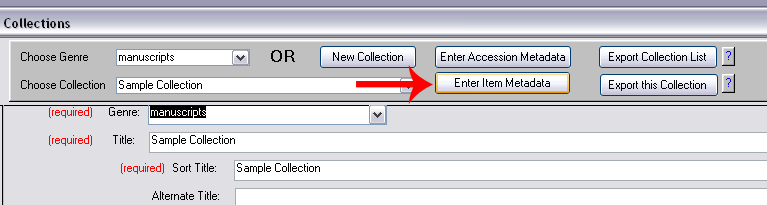
- To record information about items in a collection,
open the collection record in the Collections form of
the database and click "Enter Item Metadata" on the gray
toolbar.
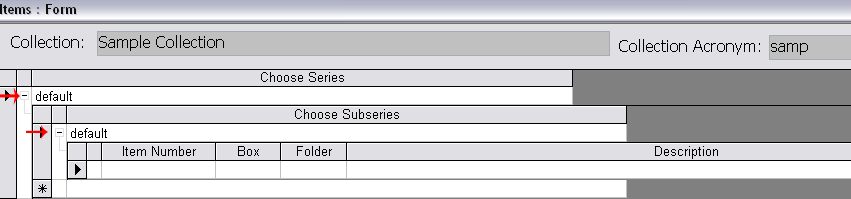
- When the Items form opens, double-check that the
correct collection title appears at the top of the form.
The collection acronym is also displayed for reference.

- To enter items, first choose and expand the series
and subseries that the items you wish to enter belong
to, by clicking the plus sign (+) beside the series and subseries. For collections without series or subseries,
you will choose "default". (If the series and subseries have not been already entered on the
Collections form, they will not appear on the Items
form. If so, you can enter the series and subseries on
the Items form (or the Collections form) before
proceeding.)
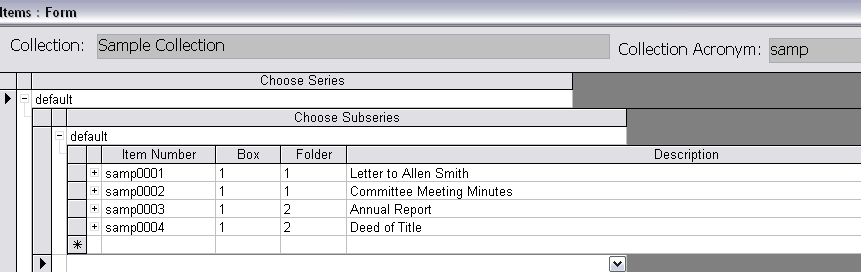
- Enter the item numbers in the column labeled "Item
Number". Each item number should consist of the
collection acronym followed by a 4-digit number. The
item numbers need not be sequential but often will be. If
you enter an item number that does not include the
collection acronym or does not end with a 4-digit number, you will receive a warning message advising you
to correct the item number. For each item, enter a box
number, folder number, and description of the item, if
this information is available.
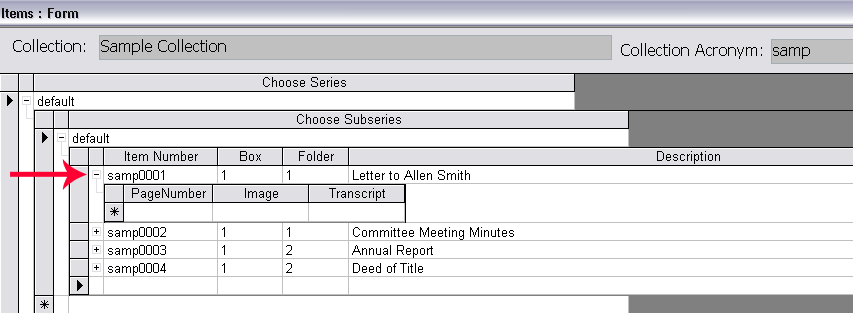
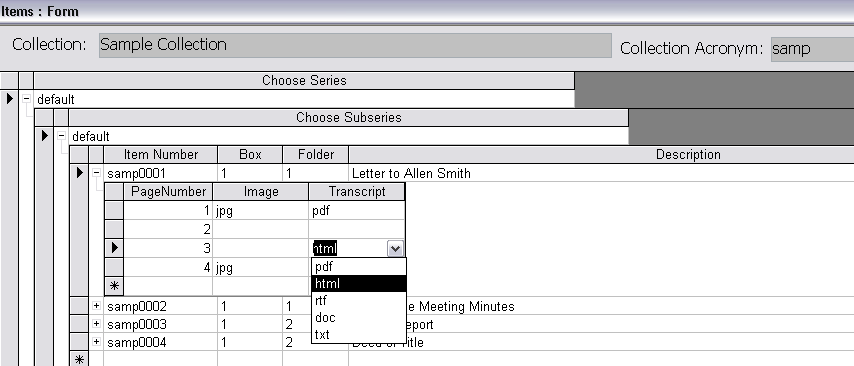
- Each item consists of one or more pages. Each page
of an item may have an image, a transcript, both, or
neither. To record information about the pages of an
item, click the plus sign (+) beside the item number.
- If no pages of an item have images or transcripts,
no page information need be recorded for that item.
However, if any pages of an item have images or
transcripts, record page information for all pages of
the item.
- A "page" of an item is considered to be any part of
the item that is represented or could be represented by a distinct image and/or
transcript. Examples:
- a front-and-back postcard: 2 pages
- a photograph: 1 page
- a 4-page letter with images and transcripts of
each page: 4 pages
- a 4-page letter with images and transcripts of 2
out of 4 pages: 4 pages
- an oral history transcript available as a single
PDF file: 1 page (even though the PDF document may
be many pages long)
- When you click in the "Page Number" box, a
sequential number will automatically appear, counting
upward from 1. If the page has a digital image and/or
transcript available on the website, indicate this by
choosing the file type of the image or transcript from
the drop-down list in the appropriate box. If an image
or transcript is not available, leave the box blank.
- When you enter a file type in the image or transcript
box and then export the collection record to create an XML
finding aid, a link will be created pointing to the image
and/or transcript for that page. In order for this link to
work, you must properly name the image and/or transcript
and place them in the correct folder on the website, using
the naming conventions for
image and transcript files.
top
