

How to Modify the Display of Finding Aids
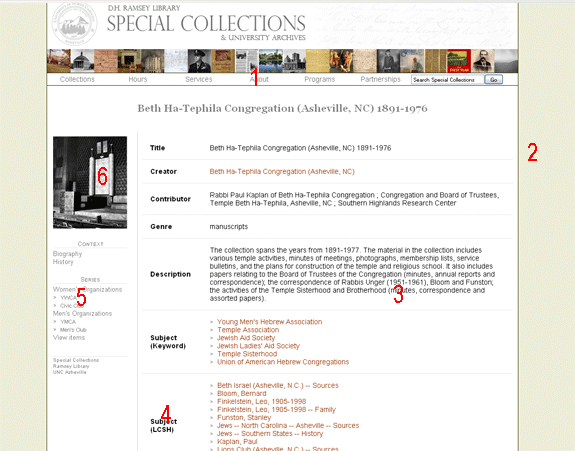
- The Special Collections banner and drop-down menu is controlled by "banner.xsl" in the stylesheets folder. Learn how to Change or Add Links To Special Collections Drop-Down Menus.
- The background color, border colors, font sizes, font colors, etc. are controlled by "main.css" in the stylesheets folder. Learn how to Edit the Special Collections CSS stylesheet.
- All information about the collection is controlled through the Collections database in Microsoft Access. To edit this content, edit the collection record in Microsoft Access and re-export the finding aid.
- The display names for Dublin Core fields are controlled by "lookup.xml" in the stylesheets folder. To change how a Dublin Core field name is displayed (e.g., to change "Genre" to "Category"), edit "lookup.xml".
- The "Context" and "Series" menus on the left of the page are generated based on information in the collection record in the database.
- The collection image is controlled by the "Collection Image URL" in the main Collections form in the database. To change the collection image, open the Collections form and enter the full URL of the desired image in the "Collection Image URL" field.